

Latest Version: 3.0
OS: Windows 11/10/8/7/XP
32-bit, 64-bit
Average: 4.61 (182 votes)
Interface languages











Best Offline Split and Merge PDF Software
Adolix Split and Merge PDF is free Windows software for managing PDF files on your computer. Use it to split documents into multiple files following a customized pattern, or combine multiple PDFs into a single document — all processed locally, without uploading anything online.
Our split and merge PDF software is compatible with Windows 11, Windows 10, Windows 8, Windows 7, and Windows XP.
What to expect
- Split PDF files without any cost
- Combine PDF files into a single document
- Mix PDF files: one page from each PDF file or by custom page groups.
- Append encrypted PDF files to another PDF
- Split PDF files using a customized pattern (similar to Word printing)
- Process password-protected PDF files
- Protect all generated PDF files with a password or watermark
- Use command line arguments to embed our PDF splitter and combiner software into your explorer context menu.
- Benefit from 24/7 support (even if Adolix Split and Merge PDF is freeware). Visit our support page to get answers.
- Multi-language support. Our Split and Merge PDF solution is available in English, German, French, Italian, Spanish, Portuguese, Danish, Norwegian, Romanian, Dutch.
Download Free Version
You can download the free version of Adolix Split and Merge PDF (5.3 MB) by clicking on the link below.
Latest Version: 3.0 · Updated 2025
After downloading, run AdolixSplitMergePDFSetup.exe and follow the installation wizard.
Upgrade to Professional Edition!
The Free version has a few limitations like: only 5 documents can be merged, only 50 pages are taken into consideration during the split process. To remove those limitations or use our software in business & commercial environments, please click the button below to upgrade to the professional edition of Adolix Split and Merge PDF.
Single user license: $19.95
Your PDF files stay on your computer
Unlike online PDF tools, Adolix Split and Merge PDF processes everything locally. Your files are never uploaded to a server, which means no privacy risk and no file size restrictions imposed by a third-party service. This makes it the right choice for sensitive documents: contracts, invoices, medical records, or any file you wouldn't want to share with a cloud service.
See how Adolix compares to online alternatives: Best Choice for Managing Your PDF Files. For a closer look at just the split feature, see PDF Splitter Software for Windows.
Split and Merge PDF Software for Windows by Adolix - Screenshots
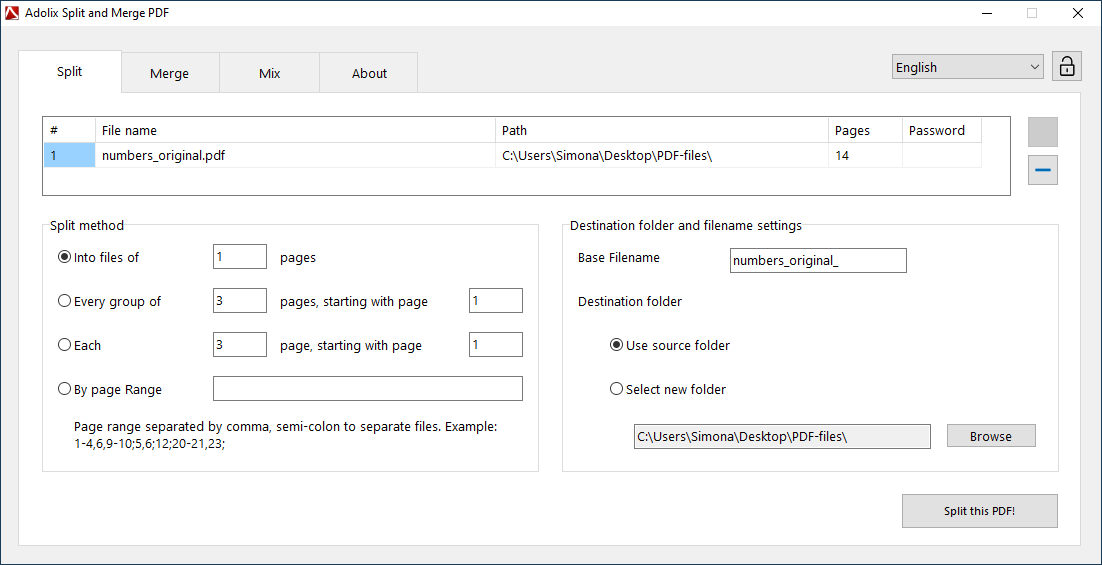
Split PDF panel
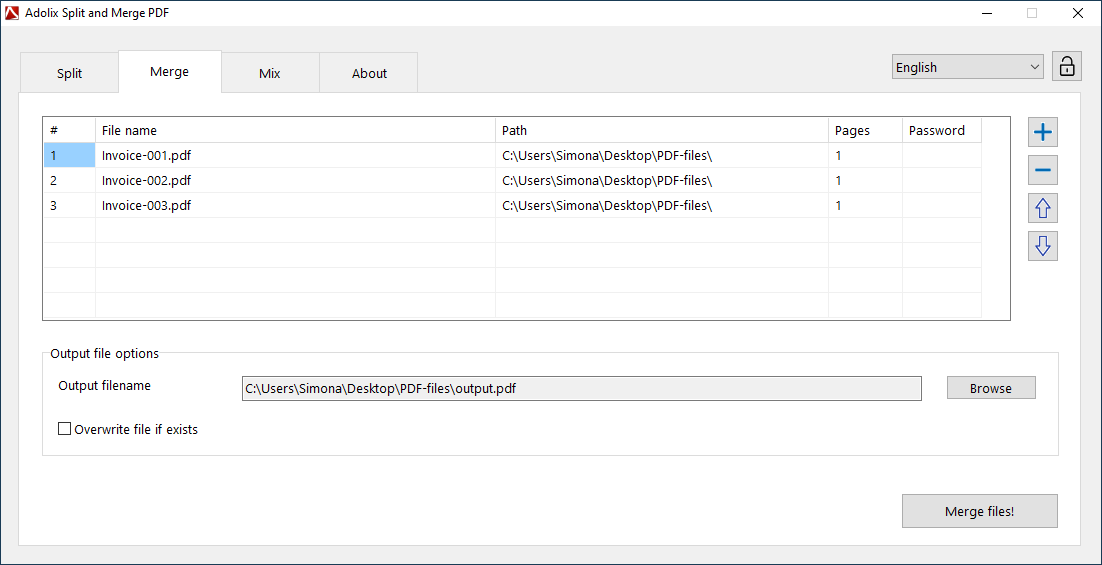
Merge PDF panel
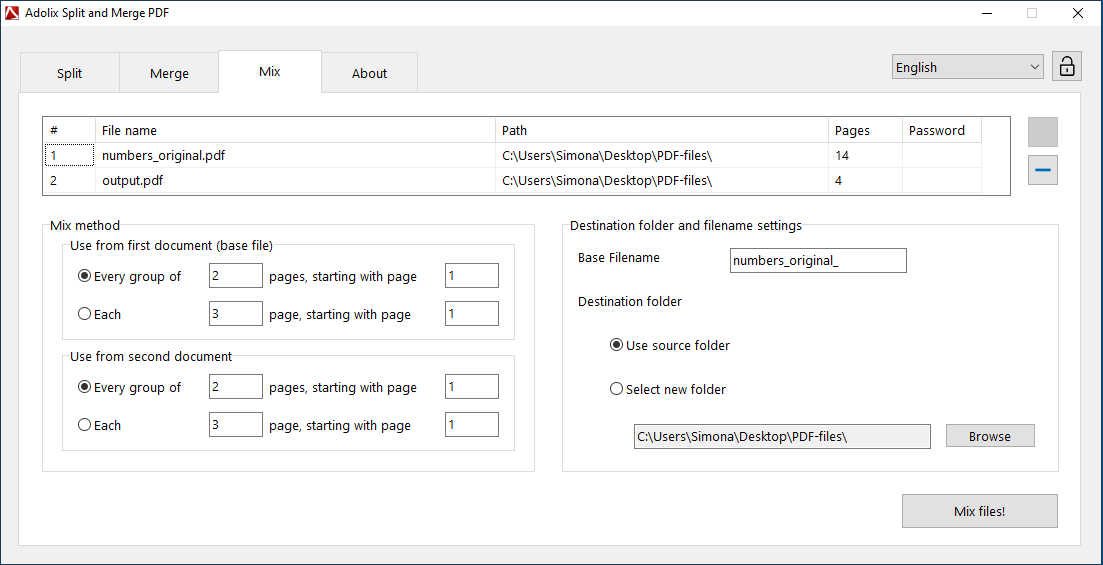
Mix PDF panel
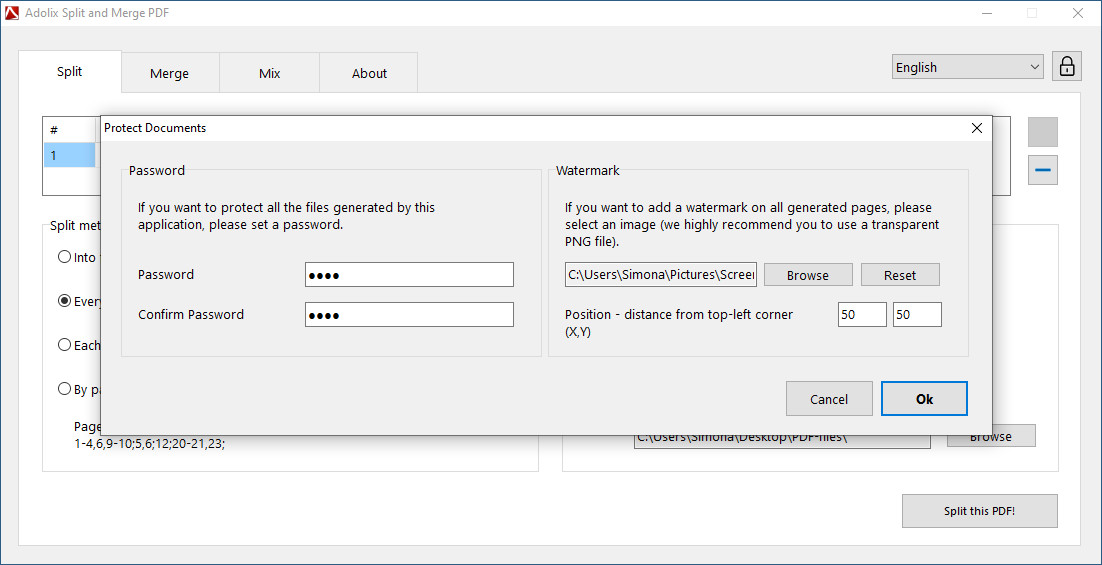
Protect PDF documents
Questions about merging and splitting PDF files? We have answers.
How do I split and merge PDF files?
To split and merge PDF files, install Adolix Split and Merge PDF, then open it, select the Split / Merge tab, add your files (or use drag & drop), customize the few settings you see, then click the `Merge files` or `Split this PDF` button.
Is PDF split and merge safe?
Yes, Adolix Split and Merge PDF is safe. Unlike online split and merge PDF services (which raise a huge privacy concern), Adolix Split and Merge PDF performs the split and merge operations locally, on your computer.
How do I merge PDF files in Windows for free?
To merge PDF files in Windows for free, install Adolix Split and Merge PDF, open it, select the Merge tab, add the PDF files, then click the `Merge files` button.
What are the limitations of the free version?
The free version of Adolix Split and Merge PDF can merge up to 5 documents and split PDFs of up to 50 pages. To remove these limits, upgrade to the Professional Edition.
Can I split a PDF into individual pages?
Yes. Adolix Split and Merge PDF lets you split a PDF into individual pages, or define a custom split pattern (e.g., every N pages, or specific page ranges).
Does Adolix Split and Merge PDF work on Windows 11?
Yes, Adolix Split and Merge PDF is fully compatible with Windows 11, as well as Windows 10, 8, 7, and XP, in both 32-bit and 64-bit versions.
Can I protect a merged PDF with a password?
Yes. After merging or splitting, Adolix Split and Merge PDF lets you protect the output files with a password or a watermark.