
Adolix Split and Merge PDF is free PDF splitter software for Windows 11, 10, 8, 7, and XP (32-bit and 64-bit). Split a PDF by page range, extract every page as its own file, or apply a custom split pattern - all processed locally on your computer, with no upload and no file size limit.
Average: 4.60 (185 votes)
Free version available. Works offline on Windows 11/10/8/7/XP. No upload, no file size limit.
Online PDF splitters like Smallpdf and iLovePDF require uploading your file to their servers before they can split it - which means your document leaves your computer, and you're working within whatever daily task limit and file size cap the free plan allows. Adolix Split and Merge PDF is desktop software: your PDF never leaves your machine, there's no file size limit, and there's no daily quota. This matters most for the files you'd least want to upload anywhere - contracts, financial statements, medical records.
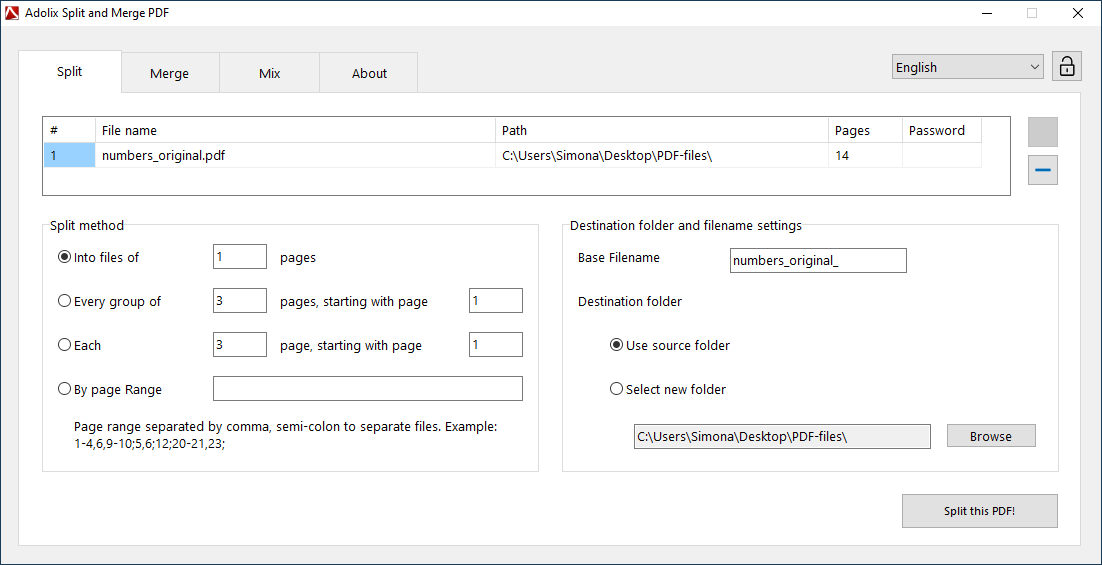
The Split panel in Adolix PDF splitter software
Need to combine files back together afterward? The same application handles that too - see how to split and merge PDF files with Adolix Split and Merge PDF.
| Adolix Split and Merge PDF | PDFsam Basic | Smallpdf | iLovePDF | |
|---|---|---|---|---|
| Processing | Local (offline) | Local (offline) | Cloud (online) | Cloud (online) |
| Upload required | No | No | Yes | Yes |
| File size limit | None | None | Capped on free plan | 100 MB on free plan |
| Free version | Up to 50 pages per split | Full features, no limit | Limited daily tasks | Limited daily tasks |
| Paid plan | One-time $19.95 | One-time (Enhanced edition) | Monthly/annual subscription | Monthly/annual subscription |
PDFsam, Smallpdf, and iLovePDF are trademarks of their respective owners. Comparison based on each vendor's publicly listed free-plan limits and pricing at the time of writing.
Is there a free PDF splitter for Windows?
Yes. Adolix Split and Merge PDF is free PDF splitter software for Windows. The free version splits PDFs of up to 50 pages; upgrading to the Professional Edition removes that limit.
Can I split a PDF without uploading it online?
Yes. Unlike online PDF splitters, Adolix Split and Merge PDF runs entirely on your computer. Your PDF is never uploaded to a server, so there's no privacy risk and no file size limit imposed by a web service.
How do I split a PDF into individual pages?
Open Adolix Split and Merge PDF, select the Split tab, add your PDF, and choose to split it into one page per file, or define a custom pattern (e.g., every N pages, or specific page ranges).
What is the difference between PDF splitter software and an online PDF splitter?
PDF splitter software like Adolix Split and Merge PDF runs locally on your computer, with no upload and no file size limit. Online PDF splitters process your file on their servers, which usually means a daily task limit, a maximum file size, and your document leaving your computer.
You can download the free version of Adolix Split and Merge PDF (5.3 MB) and start splitting PDF files right away, at no cost.
Latest Version: 3.1
Windows 11 / 10 / 8 / 7 / XP - 32-bit and 64-bit.
Also on the Microsoft Store — installs and updates through Windows.
Also need to merge PDF files, mix pages from multiple documents, or password-protect the output? See the full feature set on the Adolix Split and Merge PDF product page.